Push notifications when Transmission torrents complete
In this post I'm going to review my current setup for sending push notifications to my mobile device from the Transmission BitTorrent client when transfers complete. Here's the tech stack at the time of writing:
- Mac OS X 26.1
- Transmission 4.0.6
- Android 16 (Galaxy S22 Ultra)
- Pushover 4.3.1
- Python 3.14.2
- Requests 2.32.5
Note this is not a completely free (gratis) stack. I paid the one-time $5.00 USD fee for the Pushover app lifetime license. I like their product and recommend giving it a shot if you are trying to up your notification game. Their official integrations list goes on for pages and pages.
Disclosure: I have no relationship with Pushover. I just like their service. I've been using it since May of 2022. I received nothing from them and paid for my license with my own money. They didn't ask for this blog post, this is not sponsored in any way. As far as I know they don't even know who I am. I'm writing this post to finally document my setup and share it for the benefit of other folks.
⦾ Quick Version
So you think you're so smart? OK here's the quick version:
- Create a Pushover account, save your user token
- Register an application, save your app token
- Install Pushover on your device and register it
- Set Transmission to call a shell script when a download is complete
- Have that shell script launch a python script that makes some API calls
For the last two you want to review these code snippets:
Customize them to suit your needs (change paths, insert your unique tokens).
⦾ Code
The code component of this stack is minimal. Transmission will launch a shell script which you select in the settings menu. Your shell script will do some log wrapping around a python script.
There are dozens of other ways to accomplish this. What I'm showing here is just how I chose to do it.
First we'll create the python virtual environment. We will activate the environment and install python requests. These commands start in my home directory.
$ mkdir venvs; cd venvs
$ python3 -m venv transmission

# Activate the venv by sourcing the activate script with the '.' command
$ . ./transmission/bin/activate

# Usually this will prefix your prompt with the name of the virtualenv
(transmission) $ which python3
/Users/tcase/venvs/transmission/bin/python3

(transmission) $ pip install requests
Collecting requests
  Using cached requests-2.32.5-py3-none-any.whl.metadata (4.9 kB)
Collecting charset_normalizer<4,>=2 (from requests)
...
Installing collected packages: urllib3, idna, charset_normalizer, certifi, requests
Successfully installed certifi-2026.1.4 charset_normalizer-3.4.4 idna-3.11 requests-2.32.5 urllib3-2.6.3
Save the output from that which python3 command earlier. We'll be using it in
our actual call script.
⦾ Shell Call Script
Note, we will show how to enable the call script in a later section
I have my scripts broken into two pieces, one is a shell script called directly by Transmission. I do this for debugging/inspection purposes. It was easier to iterate and capture errors when I wrapped the business end in the shell script. Calling a notification script directly could work, but you may find it more challenging to debug.
When I first started this project I kept it simple. I didn't know what data was available to me so my call script simply dumped the current shell environment into a file for me to review. I just (correctly) assumed that Transmission was going to be setting some environment variables. Basically, this:
#!/bin/bash
env >> $HOME/transmission-environment
When a torrent finished transmission executed that script and I captured all the
vars into the transmission-environment file in my home directory. I sorted the
lines, gave it a quick visual review and found what I was expecting.
Transmission sets a few TR_ prefixed environment variables. Here's an example
when a live
recording
finished downloading:
$ grep TR_ transmission-environment | sort | uniq
TR_APP_VERSION=4.0.6
TR_TIME_LOCALTIME=Tue Jan 13 09:53:07 2026
TR_TORRENT_BYTES_DOWNLOADED=1141234951
TR_TORRENT_DIR=/Volumes/Media/Music/moe-live
TR_TORRENT_HASH=68bbb411111a98008a101eg479ccda027359a0fb
TR_TORRENT_ID=2
TR_TORRENT_LABELS=
TR_TORRENT_NAME=moe2023-09-02.ADKFestLakeGeorgeNY
TR_TORRENT_TRACKERS=bt1.archive.org:6969,bt2.archive.org:6969,
All of those environment variables are available to us in our script. I kept my
notification simple, I only use the TR_TORRENT_NAME variable. But you can go
nuts. Remember, push notifications are just the beginning, you could feed this
data into any arbitrary system you are running.
Here is the script I actually use now, it is just the wrapper around the python script which makes the API call to the pushover service:
This will capture all output into a file called new-call-log in your home
directory. You could change that to /dev/null if you want to stop debugging
(export LG=/dev/null).
I saved that file in $HOME/bin/transmission.sh and made it executable (chmod
+x). But you can put it where ever you like.
When that script runs you will see log entries like this when everything is setup correctly:
##################### BEGIN #############################
[2026-01-13-09:57:10] Call script for: moe2023-09-02.ADKFestLakeGeorgeNY
Push request accepted
###################### END ##############################
⦾ Enable the Call Script
Now that the wrapper is ready you can tell Transmission that you want to use the call script. Here is a screenshot of the settings menu where you enable the call script and select which script to use:
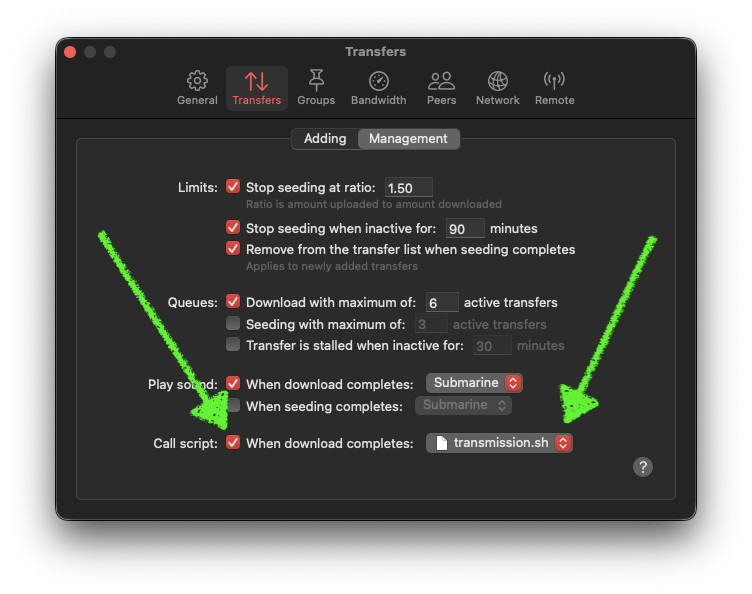
Check the box on the bottom left labeled Call script, and then click the file
menu on the right and pick your script.
⦾ Pushover
Setting up pushover is pretty simple. As mentioned before I am using the android app on my phone, but they have clients for iPhone & iPad as well as a generic browser-based desktop client.
The only limitation you will run into is 10,000 messages/month. If you are sending more than that then you will need to upgrade.
In order to send notifications you need to:
- Create an account (this grants a user key or "api token")
- Register a device (this a destination for notifications)
- Create an application (this grants an application specific api token)
Installing the mobile apps will guide you through account creation. You can also create an account online through their website directly. At this point I advise switching to a proper computer. Login to the Pushover website and get ready to copy down two values.
- (1) Your User Key
This is displayed in large letters on top on the front page when you log in. For example:
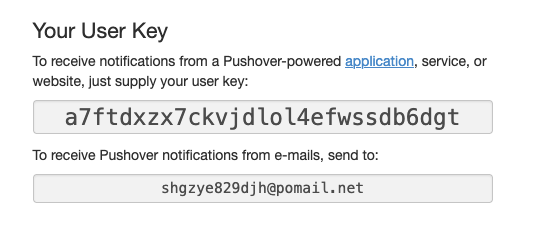
You also need…
- (2) Your Application Key
Go to the bottom of the page and click the Create an Application/API Token
link next to the Your Applications header. Fill in the values when you are
prompted. If successful you'll end up on a page like this with your new
application token:

⦾ Python Script
Next you'll make a little python script next to the shell script. I called mine
transmission.py in the shell script. Here is what that looks like:
You need to fill in the APITOKEN with your user token, and fill in APPTOKEN
with your application token. Update the shebang line (#!) with the correct
path to your transmission.py script.
That's pretty much it.
⦾ Testing
Testing isn't too bad. Here's what I did. Add a torrent, preferably something with a small file in it, and override the Seeding Limits to unlimited. We don't want this to disappear while we're debugging. Most of the live music torrents on archive.org will include small metadata files, so those are a great choice for something to experiment with.
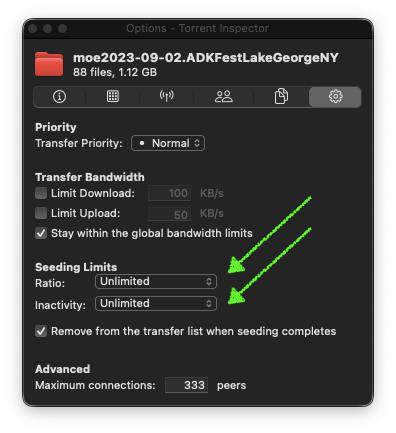
When it finishes downloading what you can do is open the data directory and delete a small file. That example torrent has some text files and little thumbnail PNGs. After you delete a file you can force the torrent to validate itself again:
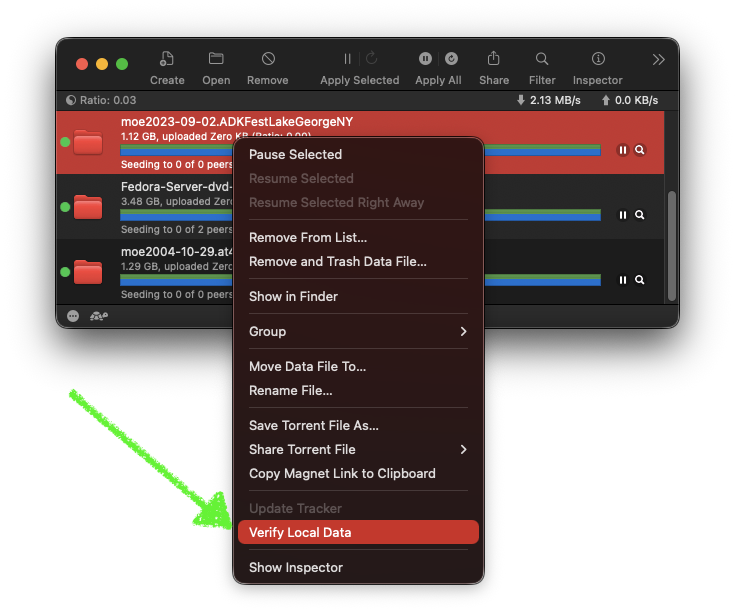
Because a file is now missing it will download the missing pieces and then run the call script when it finishes. Repeat this process until your setup is working as expected.
I recommend keeping a terminal open watching your log file:
$ tail -f ~/new-call-log
Oh! Another quick way to test the python script independently is to just
activate the virtual environment and run the script. The script is smart enough
to detect when TR_TORRENT_NAME is not set and substitute a default value
instead. For example:
$ . ./venvs/transmission/bin/activate
(transmission) $ ./bin/transmission.py
Push request accepted
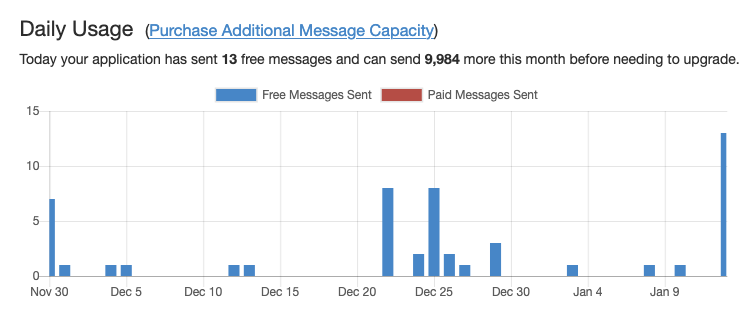
When it works you will receive a push notification on your configured device(s). You'll also see this reflected in your usage report in the pushover interface for your application.